
Memo & Money Calendar2.5 - Google Play
You'll be able to see results in few seconds.
Publisher Description


Enjoy millions of the latest Android apps, games, music, movies, TV, books, magazines & more. Anytime, anywhere, across your devices.
Memo & Money Calendar
Notes & Cash Calendar
Calendar notes and to do as jichulip management calendar.
In the form of a list of dates and expenditure management.
Did that made them look the same, but gaegosaeng kkaealgateun features.
Features>
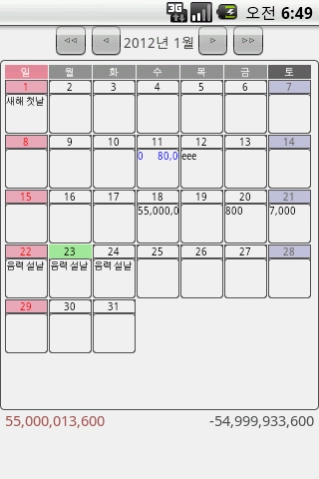
Klitschko Main Calendar
1. For important dates, glowing colors.
2. Left and right to move the slide, you can Mon.
3. At the bottom of the expenditures on the left and right balance display
4. Prefer longer flows to the title character.
5. The number of specially marked blue in the day played.
6. Pressing the menu button functions can be called a hidden three open lengths.
Klitschko notes management
1. When you select a date in the calendar, by default you can take notes.
2. On the left side of the title in the form of a list of events for that day shows.
If you select to be displayed.
3. Important If you check the schedule in the left list and the main calendar to display the glowing colors.
4. If selected, complete the check is important in the main calendar is displayed as a color less ppeolgeon.
5. I could see the time weighed. Stars features yet.
Klitschko money management
1. Notes on the screen at 7:00 in the direction of monetary button transitions
2. When you select a category of classification place pre-specify the default settings
3. Income / expenses you can choose to see that, just try something.
Later becomes separated in the statistics.
Klitschko Notes & Cash Common
1. Important / Finished / money (spending the day) is displayed at the top of the zoom.
2. Left and right arrows, it is possible to move a date from the screen.
3. Copy / Move
That date all the copy / move. Of the individual is still worried ....
4. Repeat
A month later that day to day if its value repeatedly Sikkim
Klitschko search
1. Search happened by clicking on the appropriate date, the item moves to
2. Blue money, how to identify a note I just want the purple.
ps. No time limits. Data increases, stupid-_-sqlite faith doelryeona ㅋ
Klitschko Category
1. Always easy to write if you specify the default entry may be recorded.
Later, by category can be seen in statistics, statistics ve Arthur mianham cool.
2. Specifies which statistics on the amount of support to clear a few wrote. Because the link is broken
Exhaustive history of the existing classification to other classification.
Klitschko Statistics
1. Im just as visible.
ps. I'm sorry, but this is so lousy screen, then-_-a set period and must win will put the graph.
Other ... Google and Google Calendar integration to pull it, I thought ohneungeon
We still speak again I did not know to put a
Minus functionality altogether beoryeoteum ㅋ ㅋ ㅋ ㅋ ㅋ ㅋ ㅋ ㅋ
Custer, customize, etc. While there may be an annoying one.
Klitschko options
1. Floating the main screen when you select the date set
- Select a note or cash
2. We get holidays
- Played a four gaegukman. If you need other countries dasam comment. Units are added.
3. Back
- DB file to sdcard / MMC / KeiDiary.db in the copies the.
4. Restore
- Back on top as it will overwrite anything.
>> Overwrites the existing data nalragam shoot. Caution
5. Getting down to the financial CSV
- Sdcard / MMC / MMC_Money.csv becomes a creation.
Is he may look like this bull played a pretty troubled - ㅅ -
Hangul and English language support. Woowang ㅋgut ㅋ
2011.11.28 Ver 1.0 Open!
2011.12.16 Ver 1.1
- Bug Fix
Deletion type errors fixed.
2012.01.03 Ver 1.3
- Add options screen
2012.01.23 Ver 1.4
- Change the main screen UI
- Backup & Restore added
- Additional financial CSV Download
- Language Fix
- Bug Fix (integer -> double)
2012.02.02 Ver 1.5
- Copy / Move
That date all the copy / move. Of the individual is still worried ....
- Repeat
A month later that day to day if its value repeatedly Sikkim
2012.02.15 Ver 1.6
- Stats : Month Move Button Added.
2012.11.03 Ver 2.2
- Stats page upgrade
About Memo & Money Calendar
The company that develops Memo & Money Calendar is keizwer. The latest version released by its developer is 2.5.
To install Memo & Money Calendar on your Android device, just click the green Continue To App button above to start the installation process. The app is listed on our website since 2021-07-20 and was downloaded 0 times. We have already checked if the download link is safe, however for your own protection we recommend that you scan the downloaded app with your antivirus. Your antivirus may detect the Memo & Money Calendar as malware if the download link to kei.mungcalendar is broken.
How to install Memo & Money Calendar on your Android device:
- Click on the Continue To App button on our website. This will redirect you to Google Play.
- Once the Memo & Money Calendar is shown in the Google Play listing of your Android device, you can start its download and installation. Tap on the Install button located below the search bar and to the right of the app icon.
- A pop-up window with the permissions required by Memo & Money Calendar will be shown. Click on Accept to continue the process.
- Memo & Money Calendar will be downloaded onto your device, displaying a progress. Once the download completes, the installation will start and you'll get a notification after the installation is finished.
Program Details
System requirements
Download information
Pricing
Version History
version 2.5
posted on 2021-07-20
add option menu button !!!
version 2.4
posted on 2013-11-06
2013.11.06,- Note fuction add
version 2.2
posted on 2012-11-03
Several fixes and updates
Disclaimer
Official Google Play Link
We do not host Memo & Money Calendar on our servers. We did not scan it for viruses, adware, spyware or other type of malware. This app is hosted by Google and passed their terms and conditions to be listed there. We recommend caution when installing it.
The Google Play link for Memo & Money Calendar is provided to you by apps112.com without any warranties, representations or guarantees of any kind, so access it at your own risk.
If you have questions regarding this particular app contact the publisher directly. For questions about the functionalities of apps112.com contact us.
